Halaman

    Social Items

Visit Namina Blog
Showing posts with label How to. Show all posts


Along with the Windows 10 anniversary update that was released last year, an unprecedented feature has been brought to Windows and this Bash on Ubuntu on Windows. Make no mistake, this shell bash on Windows is not a virtual machine nor a compiler, but rather a new Windows Linux subsystem. It was developed as a result of collaboration between Microsoft and Canonical, the parent company of Ubuntu Linux. If you are a developer who often turns between Linux and Windows, this feature will definitely be important to you. However, the Bash shell does not come installed by default and you will have to access the settings and tweak a little, before you can install it on your system. Now, do not start worrying, we will let you know exactly how you can Linux Bash Shell on Windows 10:

Setting Up Linux Bash Shell On Windows 10


Note
Linux Shell is the feature that was introduced in the Windows 10 anniversary update last year, so you need to be installed before proceeding with the whole process.

The process is not very complicated, but it will definitely take a few minutes of your time. Simply follow the steps correctly to avoid any confusion and get it installed on your system immediately:

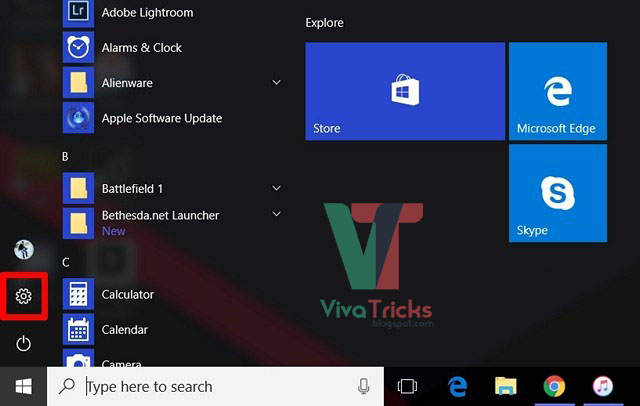
#1: Go to Start Menu and click on the gear icon in order to go to "Settings".


#2: Now, click on "Update & Security".


#3: Once done, go to the "For developers" section and click on "Developer Mode" to enable it.


#4: Now that you have enabled the developer mode successfully, you need to enable the Windows subsystem for Linux. To do this, first go to Control Panel and click "Programs."


#5: Now, click on "Turn Windows features on or off" in the Programs and Features section.


#6: Now, click on "Turn Windows features on or off" in the Programs and Features section.


#7: Now, a new window will appear on the screen. Here, scroll down and enable the Windows Subsystem for Linux (Beta). Once you are finished, click OK, wait until the process is complete, and then restart your computer.


#8: After restarting your PC, type "bash" in the Cortana search bar and hit Enter to run the command.


#9: Once bash opens up, type "y" to continue. Wait for a few minutes until Bash on Ubuntu on Windows is downloaded from the Windows Store and installed on the Windows subsystem.


#10: Once everything has been downloaded and installed, you will be asked to enter a new UNIX username and password. You will have to retype the password, and once the password is matching, installation will be successful.


Bash on Ubuntu on Windows: The Experience


Now that you've successfully got a bash on Ubuntu in Windows 10 to work on your computer, you can start using Linux-compatible file systems and various commands, similar to what you would do on a Linux computer. However, keep in mind that you have not installed Ubuntu on your computer. This is basically a software that can be used to try out standard Linux commands right inside Windows. If you're new to the Linux environment, you can try the following commands that you personally tried:

grep - searches for named input files for fonts that match the given pattern.
sed - A stream editor that is used to make basic text transitions on input stream
awk - Process and analysis of text files.
rmdir - Remove directory.
man - View the directory of the specified command that was entered. For example, you can write "man rmdir" for relevant information on the Ramirer.
It is not only the use of commands that must be excited, because users will be able to implement Windows, as well as Linux applications right from the Bash shell. In addition, you will also be able to run Bash Shell scripts and Linux command line applications.

Ready to Use Bash Shell in Windows 10?


Developers can take full advantage of the Bash shell if they normally work on both Linux and Windows. Thanks to Microsoft, this is finally possible. However, the Bash shell will either be an advantage that you are going to use widely or not at all. Most users do not really care about this feature, but if you really want to experience and experience the Linux environment, you can do it instantly with ease. I do not think you're installing Linux directly on your computer, because "Bash on Ubuntu on Windows" is just a tool to run Linux commands directly from Windows. So, are you excited to try out shell bash linux on windows 10? Let us know, by shooting your opinions in the comments section below below.
How to Setup Linux Bash Shell on Windows 10


If you are used to doing some late night work for long hours in front of your computer, you may have realized that the pressure on your eyes is real. In order to counter this, you probably have used f.lux on Windows, and if you are a users of YOS or Mac, you probably used the night shift. With the release of Windows 10 Creators Optite again in April, Microsoft has made it much easier by pushing out a neat new feature called Night Light, which aims to reduce the eye strain used by filtering the blue light emitted from the screen. The right feature was built in Windows 10 and works better than f.lux. So, without further ado, let's take a look at how to set up and use Night light in Windows 10:

Enable Night Light in Windows 10


Note
Night Light is a feature that was introduced into Windows Update 10 creators last year, so you need to have it installed before proceeding with the whole process. I have tested this feature on my laptop running Windows 10 Build 1703 Preview Inside.

Night light can be easily enabled in Windows 10 settings. Just follow these steps to turn it on:

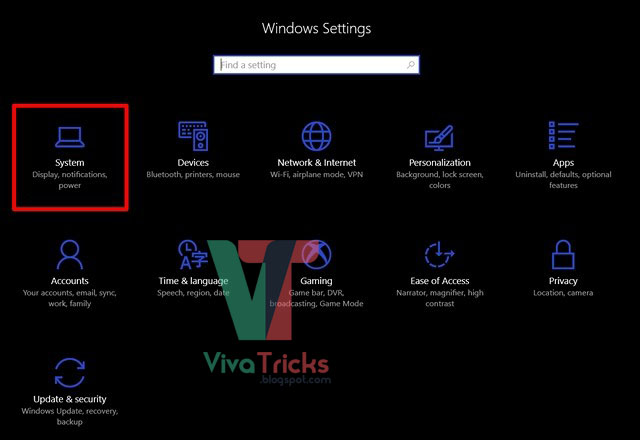
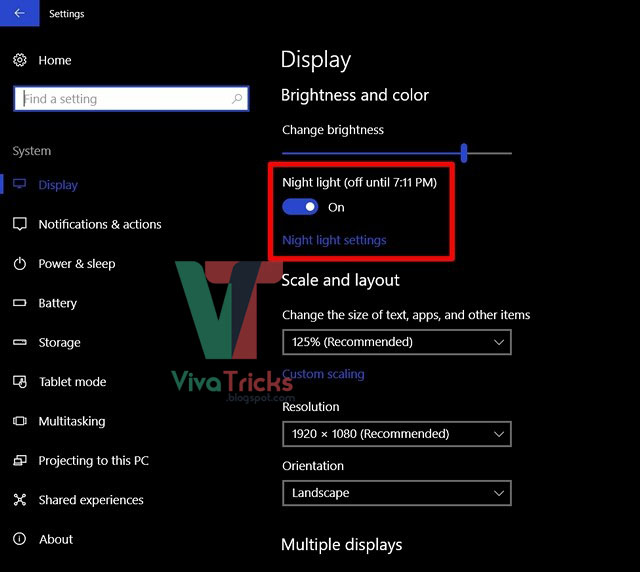
#1: Go to Start Menu and click on the gear icon, so that you can go to "Settings".


#2: Now, click on the "System" section to go to System settings.


#3: Once you’ve entered System settings, you’ll be able to turn ON Night light in the "Display" section.


Customize and Schedule Night Light

The night light, by default, is set to turn automatically by sunset and turn off before sunrise depending on your area. Also, there is preset color temperature for night light. However, you can easily change these settings according to your preferences simply by following these steps:

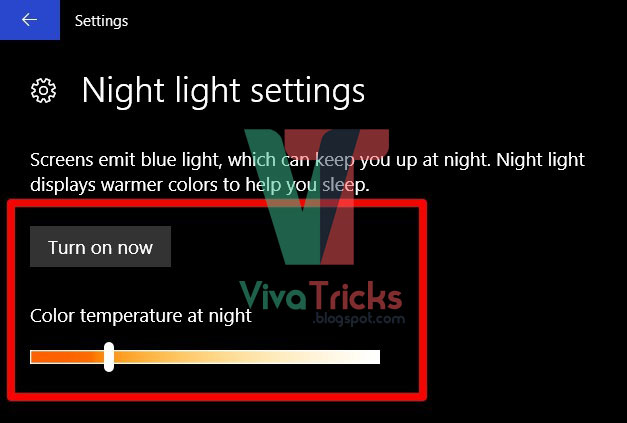
Go to the "Night Light Settings" right below to customize it according to your preferences. You will notice the slider to adjust the night color temperature completely according to your preferences, so this will be the color temperature that will be used, next time when the night light is turned on. You can also turn on the night light immediately, without waiting for the preset time by clicking "Turn on  Now".


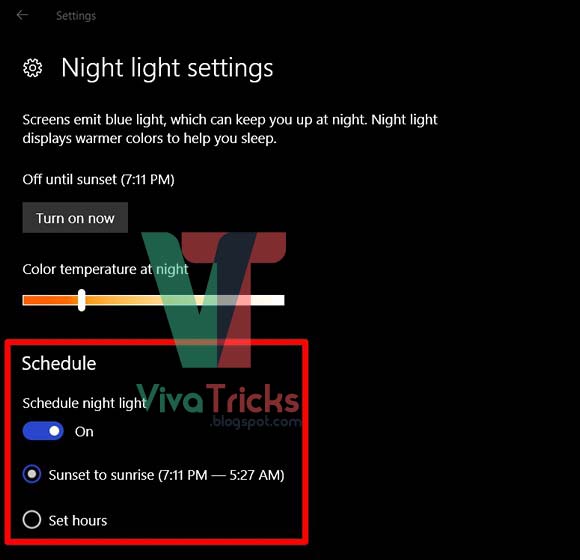
There is a light night schedule option as well. If you want to disable scheduling completely, you can turn it off by moving the slider. If you want to customize the schedule according to your needs, click on "Set Hours" and simply choose your pet turn and turn off time.


Well, that's pretty much it, as now the night light will automatically turn off as per your preset interval. When the night light is turned on, you will see a warmer warmer color attaching, which emits a blue light from the screen and is much easier on the eyes.

Avoid Eye Strain With Night Light on Windows 10


Night light is Microsoft's attempt to help people come out, to reduce the pressure on their eyes because of long hours of use in front of their computers especially during late at night. It works like a charm, as you expect and it is now up to you to take full advantage of what Microsoft has to offer. We strongly recommend you to keep this feature enabled on your system. So, have you ever used the night light feature on your Windows 10 machine? Let us know what you think about this neat feature simply by dropping a few words in the comments section below below.
How to Enable Night Light in Windows 10


SnapChat has just paid a big update that probably changed the way we use the app crazily popular. Many new features have been included in the application such as boundless snaps, loop videos and other promising tools designed to keep users working. One of the new features that caught our eye is the Magic New Eraser tool that lets you blur a certain part of the snap that you may not want to see people. The technique works quite similar to the Adobe Light Lite spot removal tool, but much more streamlined. So, if you are interested, you probably want to know how to use the new magic eraser tool on Snapchat on Android or iPhone:

Using The New Magic Eraser Tool On Snapchat


First of all, you will have to update to the latest version of SnapChat from the App Store or Play Store . Then, follow the steps below to start using the Eraser tool on your snaps:

#1: Once you open the Snapshot application, you are taken directly to the camera. Now, take a random snap and just click the scissors icon.


#2: Once done, tap on on the Magic tool indicated by stars icon.


#3: Now that you're done, you can blur any part of the image simply by scrolling over a specific area. For example, I am trying to remove the Alienware logo on my laptop, so I just criticize the area where the logo is located.


#4: Once done, wait a few seconds for the magic to happen. Then, you will notice a blurred area on your snap. SnapChat replaces the blurred area with colors that match the area to make sure that the blur is not easily noticeable.


#5: Well, that's pretty much. From now on, I do not think I have to transfer the pictures to my computer and use Adobe Photoshop or Lightroom to remove stuff from my photos anymore. However, keep in mind that unlike Photoshop, it only erases a certain area and is easily noticeable to anyone who looks at the snapchat.

Blur Unwanted Objects With Snapchat’s Magic Eraser Tool


The SnapChat Eraser tool is very useful if you are in a hurry to send the picture, but you do not really want someone to notice a certain area of the snap. Who has enough time to transfer photos to a PC and Photoshop it anyway? Well, we certainly are not and we are sure that there are many of you who will agree on this. However, if you are a professional in photo editing, this tool may not excite you at all. So, let us know your thoughts about this new tool in Snap Chat simply by dropping a few words in the comments section below below.
How to Use The New Magic Eraser Tool On Snapchat

What is HDR and How to use it on Phone - Viva Tricks

Thanks to improvements in mobile phone innovation and innovative mobile phone has a camera which has taken place in the past several goods. Have left behind the camera Ordinary digital cameras many ways in which mobile phones are camera people prefer to buy rather than buy a good camera phone. Camera industry hard time giving for mobile companies have their cameras and their software to a better camera than the standard are becoming better but have also created a complicated use and which only a click air was still coming up with so many new options that baffle me.
Such as HDR (High-dynamic-range) feature in a camera. What is HDR is used for and how to end it? Additional camera users often think they see this option.

What is HDR?


HDR is the English acronym (High Dynamic Range) which will be described in simple language that is an average of light and darkness in the picture. That water may be blue, but it could offer a more HDR Blue will make your photo more beautiful.

The HDR The camera takes three photos that are taken on a rather different lights, and a much better picture by combining three are presented to you. You'll know that it is possible to then take the image by placing custom lighting scene when HDR Camera a good image is a photograph of three different lights for you, if you are familiar with photography offers.

Photo source: quadvisionphotography.com

Benefits of HDR


I hope you will understand that this description HDR draws in a more elegant way to image the camera image without HDR. Moreover, the HD image capture with R is closer to the actual scene. If you are eager to make photos in landscape or better natural light that is almost the whole year in Pakistan HD URL you an excellent tool that your pictures DS to R (DSLR) camera than the law stands.


When should I use HDR?


Says making landscape images landscape HDR should be used. It displays beautiful images you see in the sky as well, but does not deepen the color. It is kubaasany you get a beautiful picture.

Some places you should avoid drawing HDR images from the top 'in motion' is'. In fact, when you take a picture with HDR you will realize that it takes a little longer than normal picture and when you move or want something to take a picture that is in motion HD it is better to avoid restructuring.

Good natural lighting through HDR photography can be excellent but is in sharp scorching heat can ruin photos use. So if you are drawing a picture of very bright colors, and you should avoid the use of HDR.

In the end


You will certainly get seen pictures of the scenes that are even more beautiful than reality, the colors you see them so that you are forced to pay a fine resolution. It's the perfect HDR. Overall HDR is a great tool that your phone photography can be taken to the next level and you are drawn to pictures of the most 'Likes' may be further enhanced, concluding Capacity

What is HDR and How to use it on Phone?


If you are new to the jailbreak world, it can be a very daunting place. There is no denying that there are a number of malicious disk escapes in the wild. Also, there seems to be a lot of noise surrounding the legal setting of the jailbreak. So, today I'll tell you how What is Jailbreaking and Is Jailbreaking Legal?

What is Jailbreaking?


I would quote Wikipedia a lot, so here's what I should say about jailbreak:

Jailbreak: (Noun) Escape from Prison (Jail).

Maybe you're thinking about what you're doing even remotely with the iPhone. To answer this question, we need to understand the "philosophy of the park" Apple's philosophy. A "walled garden" is a closed platform where the provider, in this case Apple, decides to exercise strict control over applications, content and media. What this basically means is that Apple scans each application carefully and controls the applications that you can install on your iOS devices. But not just about applications, these restrictions are imposed throughout the iOS, thus making it really a "walled garden".

Jailbreak is the process of escaping this "fenced walls" and removing all Apple software restrictions imposed by Apple. So, now you can get the measurement from Wikipedia definition, right? Mobility around these restrictions may be anything, such as installing apps that Apple does not agree with or customizing the Evon device in a way that Apple will not normally allow you to do.

Now that you understand what jailbreak is actually, you're probably curious to learn Apple's position on this whole jailbreak thing. Let's see whether jailbreak is legal and what Apple thinks about it.

Is Jailbreaking Legal?


Given the large number of laws in fact, the answer is not black and white. Fortunately, in most countries, the laws tend to go further down the road Jailbreaking is perfectly legal. Escape is usually governed by laws that protect digital rights management mechanisms, such as the Digital Millennium Copyright Act (DMCA ). In 2012, the US Library of Congress exempted jailbreak iPhone from the new Millennium Copyright Act , making it legal. The Library of Congress holds a meeting every three years to discuss and reassess new exemptions. Surprisingly, while the iPhone jailbreak was made legal return in 2012, it was only in 2015 when the jailbreak made the iPad. The next meeting is scheduled for 2018, and it is very possible that jailbreak iPhone / iPad will remain perfectly legal, at least in the United States.

In countries such as Canada and New Zealand, laws allow circumvention of disaster risk management for purposes other than copyright infringement, which essentially means that escaping from prison is entirely legal in these countries. There is no country, to my knowledge, that jailbreak iPhone / iPad as a crime punishable.

Of course, all this does not mean that Apple likes the idea of jailbreak Edifies. Here is what support Apple page to say about hardware jailbreak:
Unauthorized modification of iOS can cause security vulnerabilities, instability, shortened battery life, and other issues..

For one, yes, Apple is right about it. As you will see in the next section, a jailbreak device can cause security flaws and poorly designed design that can cost you phone instability and battery life. Another important takeaway of their official statement is that your jailbreak your iPhone blanks your warranty. Because of this, Apple reserves the right to deny the service to the iPhone or iPad.

But wait there is a plot development: Apple does not completely hate the jailbreak society either. Because the community helps to detect security vulnerabilities, which then Apple addresses and debugging quickly. Also, there have been many occasions when Apple has stolen a borrowed function from a third party jailbreak disk and baked them directly into the iOS. All in all, I would like to summarize this section by comparing the relationship between Apple and the jailbreak community that Joker and Batman: "I do not, I do not want to kill you! What would I do without you? Complete me." (This was some spot analogy!)

Is Jailbreaking Safe?


The Cydia application store is an alternative to the Apple Store and home to thousands of jailbreak / disc applications. Cydia hosts many awesome jailbreak disc but considering the number of warehouses and the lack of central authority, most applications are largely unlit. Such applications can contain malicious code that can infect your iPhone with adware, spyware and trojans.


There have been at least 5 cases in the last few years when malicious applications have been heavily exposed to the iPhone. "Unflod", discovered in 2014, Apple's user credentials are captured and sent to a server in China. "Zisser Times", discovered in late 2014, stolen personal data from the user's device and executed remote commands from an external server.

Therefore, the short answer to whether jailbreak safe for the average Joe is: no. However, if you are somewhat of an advanced user who understands the inherited risks with them, the idea of ​​escaping may not look bad. If you are a person who values ​​freedom on security and is going to jailbreak anyway, I would recommend you something: do not install the tweaks from the shady third party repositories. Also, keep away from pirated applications and has God, turn on two authentication agent for your Apple Ed.

Jailbreaking vs Rooting?


Speaking incidentally, iPhone jailbreak will be the equivalent of rooting the Android phone. It's only when you dive into my technical nitty gritty that you understand the difference between them.

Technically, Jailbreak is the process of installing a set of kernel patches that give you root (unrestricted) access to the iOS file system. Rooting is the process of finding exploit on the Android device to gain access to the root administrative level. This may be the only similarity.

These days, most Android manufacturers allow you to open boot loader on their phones. You can Cidlode applications on Android, all without having to root your device. In contrast, Apple ships the iPhone with a boot loader locked and it does not allow sidelwading of applications without jailbreak. Thus, it is only the root side of the jailbreak and rooting which is similar.

Also, Android being an open source means that you can replace the stock operating system and install a completely different custom ROM. If this sounds too much, you can even install the cupcd window and show off your customization skills. Given the nature of the closed source, this is not possible with iOS, even if it is jail.

The main takeaway of this discussion is this: Android displays much lower restrictions than the iOS out of the box. Even after jailbreak the iPhone, the amount of freedom you get with the iPhone iPhone is nowhere close to your Android device rooted. Do not get me wrong, jailbreak opens up a lot of potential on your iPhone, but the truth is said, rooting robot puts Android in the far league.

Understand Jailbreak Better?


I certainly hope that this article helps you understand the best jailbreak and answer most of the questions surrounding it. Now that you understand the security aspects related to jailbreak, you are in a better position to answer whether you should jailbreak your Edifice. Always remember: With great power comes great responsibility. So, if you have decided to take a step, jailbreak your iPhone once you have done that, browse through our many articles related to jailbreak. As always, if you have any unanswered queries, please let me know in the comments section below and I would be more than happy to address them!

What is Jailbreaking and Is Jailbreaking Legal?

Find IP Address of Websites using Command Prompt (CMD) | Viva Tricks

Using IP address you can find the whereabouts of the website server and do more stuff. I will demostrate this tutorial with Google but you can use to find the IP address of any site such as Twitter, Facebook with this method, so lets start.


How to find IP Address of Any Website?


#1: Press Windows key + R from keyboard and Type CMD.

#2: Now write Ping followed by website URL whose IP you want to find, See picture below.

Find IP Address of Websites using Command Prompt (CMD) | Viva Tricks

#3: Now Press Enter.

#4: It will take less then a second and come up with the results as shown below.

Find IP Address of Websites using Command Prompt (CMD) | Viva Tricks

Find IP Address of Websites using Command Prompt (CMD)


Despite the fact that in this era of modern technology fax machine may be overruled by e-mail but still may find yourself in a situation where you have to send a fax to some governmental or private institution. Fax machine has only advantage is that you do not need any computer is ever to send and receive documents that may be a good thing for small businesses. Also immediately will get a printed copy of any document via normal without the need to print phone line. But again the drawback is that you need a fax machine in order to do all these processes.

Things you need:


  • Scanned Document (in digital form)
  • Online Fax Service

In order to send a fax online First you need to scan the document. If you are already in digital form, congratulations you are ready to send the fax.

#1: HelloFax


HelloFax is a fax online service that lets you send free faxes 5 a month to anywhere in the world. Some of you may say, five faxes a month is not good enough but it's enough for students who wants to apply for a job etc. In order to send the fax All you have to do is create a free account on the Internet, enter a fax number with the country code, enter your complete and attach a digital copy of the document.


#2: Fax Zero

Unlike HelloFax Fax Zero allows you to send five 3 pages of the fax on a daily basis which is really cool, especially when it is free. But the downside is that it also will be printed in a small ad on the document that may not be so good if you are sending the document to some government officials. Also you do not need to create an account on the site just visit the site and complete your details. Attach a file with and send it over the Internet.


Receive Fax Online


Unfortunately at this point in time is not a service that allows you to receive faxes over the Internet for free. Hellofax allows you to receive faxes for 30 days which is a good thing if you want to try the service.

Send and Receive Faxes Free via Computer without Fax Machine


The best way to keep your account secure is knowing the tricks which Hackers do.

You will surely have heard from friends that his account was hacked, or it may be an accident has occurred with you. But how is hacking? Who are they hacked into the computer experts who have expertise with all other accounts? When computing Facebook page and have received numerous requests to teach hacking email him know that I'm so sorry. Because people want to learn hacking is done just to hack email accounts of others and Facebook. There are tools on the internet to try to fulfill his wish and claim that they hacked Facebook account, etc., but nothing happens. Note that you can only submit your account hacked because of their ignorance and just managed to hack accounts only because of the information. In this article, we'll take them why and how to hack accounts on simple and ordinary things.

Passwords


Most people do not use weak passwords, but use the same password for multiple accounts. And to encourage them to understand the hacker to use your password leak. The biggest websites such as LinkedIn and Yahoo etc. Over the years, the database password has been leaked. Do not use it at all for that use different passwords for each account and a password, which you have the slightest doubt that they know someone. The password numbers and special characters that should always be extremely difficult to crack them.

Top 10 Most Used Common Password
If any part of any deal will also have to give your password to change the password immediately after completion. In fact, every two or three months, continue to update your password.
Yahoo! Did password on the database leaked out that thousands of people were using computers with simple password:
password, welcome, qwerty, monkey, jesus, love, money, freedom, ninja, writer.


Keyloggers


Keyloggers are programs that have been typed on the keyboard do all the words of the note. Use a good anti-virus on your system, the easiest way to avoid it and keep it always updated.
Exercise caution when using public places and login to their computers. Use only your personal accounts on trusted sites. Login Do not ever save your password and do not have to log out there.

Phishing


This is a dangerous way to steal passwords. If the account is hacked so at least you know that your account is not in your control. But with me there if you get a password, he can log in to your account and you do not even know.
It is to be understood from the example that you have received an e-mail message or mailbox on Facebook, which is no link. If you go to this link on Facebook, are open mail or Gmail Hotmail etc page. You are now logged in and your password reaches the hacker. Actually you are logging on the page where you consider a URL Bar will not address Facebook or Gmail, but there will be spam URL but the page will not be Facebook or Gmail.
In fact, it is exactly like the design of a page which people become stupid. The login details provided are stolen and they do not even know. To avoid this problem, see URL should consider opening page is a link.

Security questions


To hack any email account has a big hand security question. I always say most people do who know they hacked accounts. Suppose my security question "Who is my childhood best friend?" It is obvious that people can easily find out the answer to my burden.
But even if I enter the correct information here is my own fault. I find these numbers on the correct answer to that question is no test will fail me to answer you. But here is my own security. If the answer friend instead of an enemy, or even name anything else like me to coffee cup, helicopters, on the cricket or a meaningless word e-mail service will not be any objection to this.
In reply to the questions of security Always. Write a response which could not bear the thought of any Kato. If the answer you should take the right turn immediately.

Mobile phone number


Today, almost every major e-mail service and can be added to your mobile phone number in the Facebook account. So that if, God forbid, be sure to get an account using either be a problem with your account number.
So be sure to include your account number and a number that are there to keep you. If you change your number, do not forget to change it in your account.

Alternate email


Often people experience that it has no alternative email accounts added to another email address. Often the fixed account to another and began to use. Then suddenly hacked account that one day it happens. Take a valid alternate email address in your account is required in order to reset the password request can be received on this.

Saved passwords in Web Browser


Every web browser that invites you to save your password so do not have to type it again. Browsers your password reserve in plain text. Or should certainly not a master password or keep their passwords safe password. As this feature is available in Firefox.

Conclusion


Facebook and e-mail services, security is extremely tight. Today the situation a few years ago is not so now. Nobody's been no easy matter to account hacked. As you leave the thief that you read this article, which robs someone using your account and you think an expert hacker blew your password.

How they Hack Facebook and E-mail Accounts