Halaman

    Social Items

Visit Namina Blog
Showing posts with label Facebook Tricks. Show all posts

Privacy on Facebook is the biggest problem now a days, especially for girls today are going to learn in the privacy settings Urdu. With so many programs available on the Internet through which one can easily manipulate the images it is very important that you only share photos with close friends and family only. Often the exchange of images such as wedding photos or holiday snaps taken on the birthday party and we do not want to share with our office or college friends.
The Solution is Secret.li

With the continuous increase the quality of the camera and people use smartphones to capture images directly from their smartphones and share instantly on Facebook, a very dangerous thing because you can not control the privacy of images from your phone unless you have installed the application of Secret.li .

Download this Android application, designed in a way how long it will take a picture of the smartphone will be encrypted immediately and gives you options to share it with people just want to share. It also contains an amazing feature of the deadline, which deleted the picture after the passage of some time out of your schedule, which means privacy safer.
Download

How to Make Facebook Pictures Private

How to Customize Facebook News Feed to See Relevant Posts | Viva Tricks

Since its inception in 2006, the Facebook news feed a lot of radical changes witnessed. The fact that you can see your friend status, photos, video updates and communicate with brands all in one news feed is at the core Facebook experience. News feed is designed to show you the stories of interest to most of you, as determined by the algorithm Edgerank on Facebook. However, sometimes things can go awry and that may not see the posts actually intend to see in your Facebook News Feed. Luckily enough, you have a great deal of control over what you see in the latest news for you - starting with the customization options inbuilt for various third-party solutions. So, today I will show you how you can tweak the Facebook News Feed to see relevant posts:


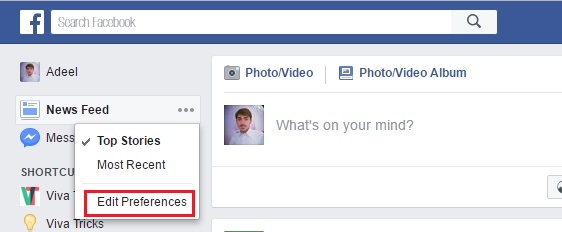
Use Facebook News Feed Preferences


How to Customize Facebook News Feed to See Relevant Posts | Viva Tricks

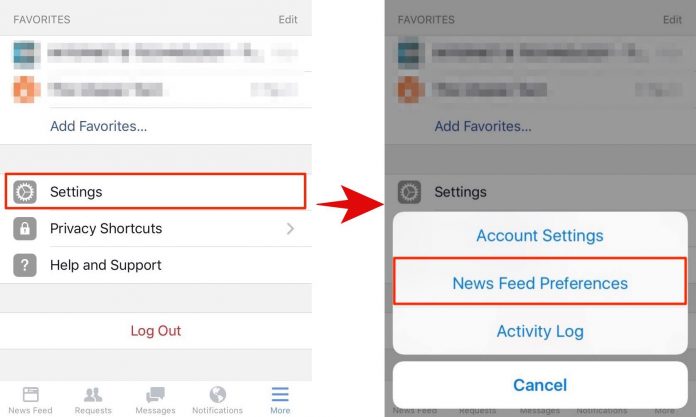
If you’re using the mobile app, go to the "More" tab and tap on "Settings" > "News Feed Preferences".

How to Customize Facebook News Feed to See Relevant Posts | Viva Tricks

Change Priority of People in News Feed


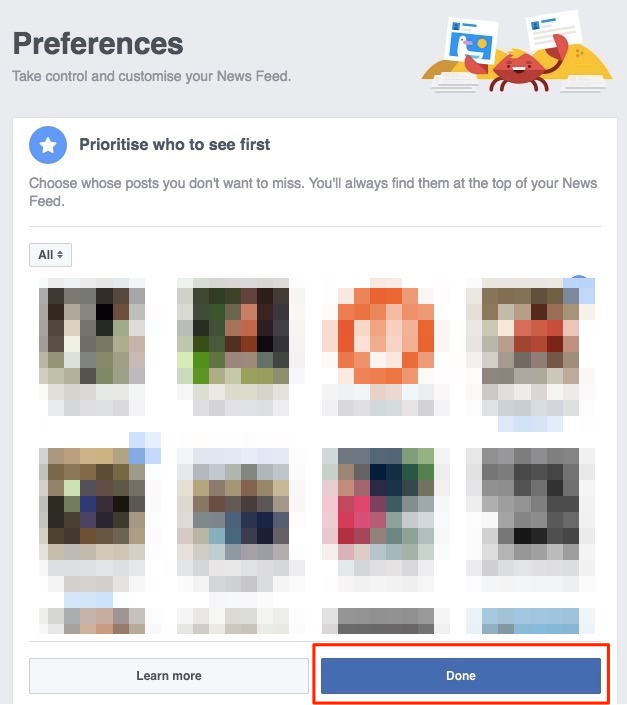
The first option in the Preferences page news feed is "Prioritize who to see first", and allows you to select friends who will always appear at the top of the latest news you have a job. You must choose the friends you do not want to miss any of the stories, and then click "Done."

How to Customize Facebook News Feed to See Relevant Posts | Viva Tricks

Hide Posts of Specific People from News Feed


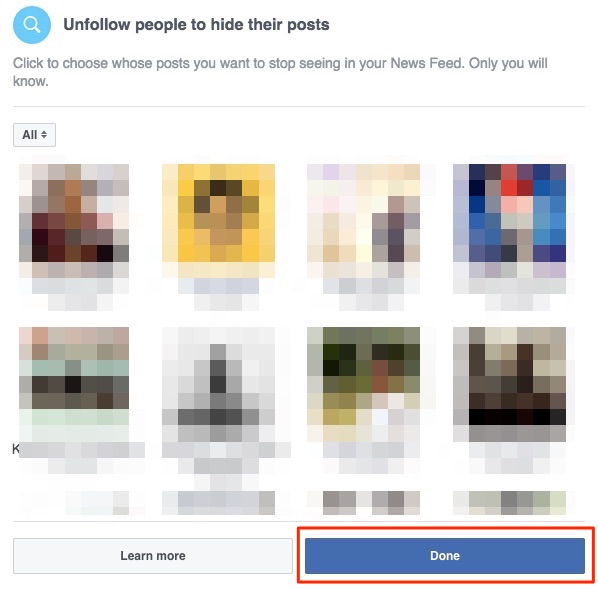
The second option, "Unfollow people to hide their posts," it allows you to unfollow people, so that their positions will not appear in the latest news for you. Follow-up after you cancel, you still friends with them, and they will not be notified that you canceled the follow-up to them. Select this annoying co-worker who functions images of everyday meals here and click on "Done".

How to Customize Facebook News Feed to See Relevant Posts | Viva Tricks

There are a couple of more options - to discover new pages to like and communicate with people already follow. But if you're looking to reduce the clutter of the latest news to you, and you do not want to change these settings at the moment.

Tweak News Feed While Browsing


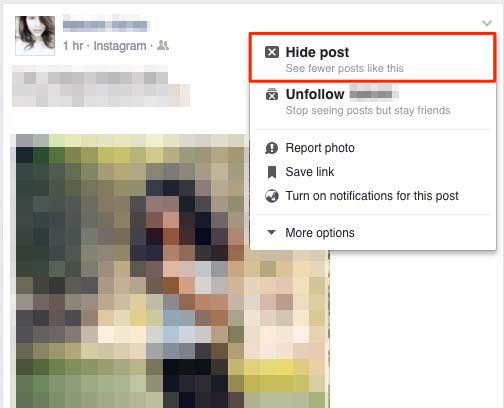
Apart from the above options, you can set some preferences News Feed disk while you browse the latest news, on the go. For example, if you do not want to see the job, you can just click on the little arrow down on the right side of the post and click on "Hide post." Facebook will make sure it shows you the number of less than posts like this.


How to Customize Facebook News Feed to See Relevant Posts | Viva Tricks

Unlike Pages You Don’t Want Posts From


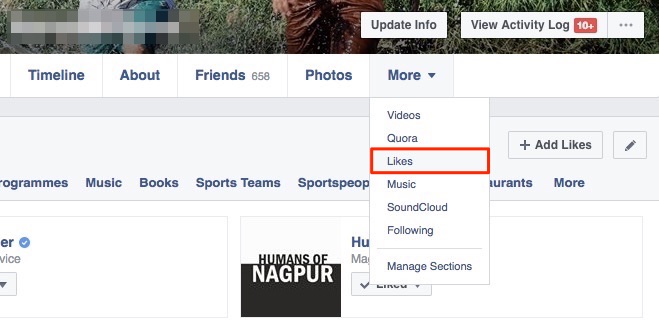
We are all guilty of liking berserkly pages in the early days of Facebook. Let's reduce the number of posts by pages in the latest news for you. Click your profile name, hover over the "More" tab and click on the "Likes." Here you can contrary to the pages that you do not want to see posts from.

How to Customize Facebook News Feed to See Relevant Posts | Viva Tricks

Hide Posts by Specific Image Type


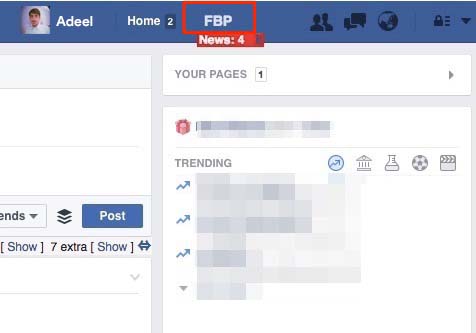
In this section, I will introduce you to extend a very powerful browser to Facebook - FB Purity. It is available as a free download for all major browsers including Chrome, Firefox, Opera and Safari.

How to Customize Facebook News Feed to See Relevant Posts | Viva Tricks

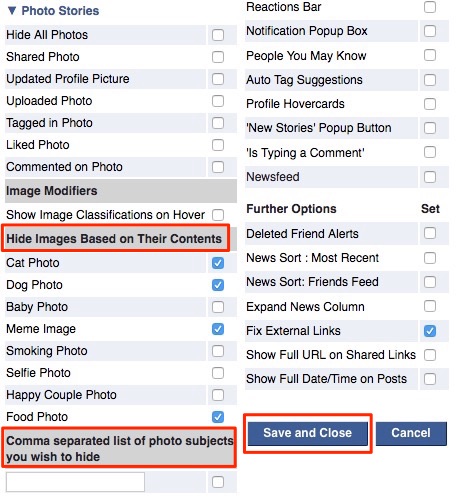
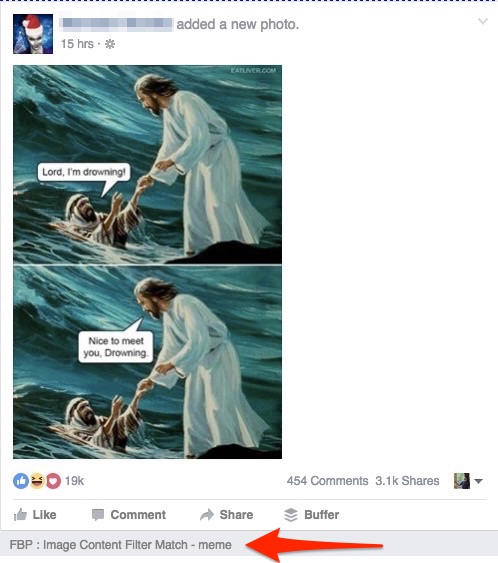
After that, click on the "Photo stories." Here, you can see "Hide image based on the content." Here, you can check any of the categories find annoying or better yet, manually type in the picture are subject to hide all the photos from that category and click on the "Save and Close."

How to Customize Facebook News Feed to See Relevant Posts | Viva Tricks

It uses particular Amnesty International Facebook to Waltaraf pictures so I have to work very well. Notice how the liquidation of the images of a certain type, and describes the corresponding beneath candidate. If you are wondering how to access your graduation pictures, click on "Show" to an extra side in the top of the latest news for you.

How to Customize Facebook News Feed to See Relevant Posts | Viva Tricks

Hide Posts Containing a Specific Word


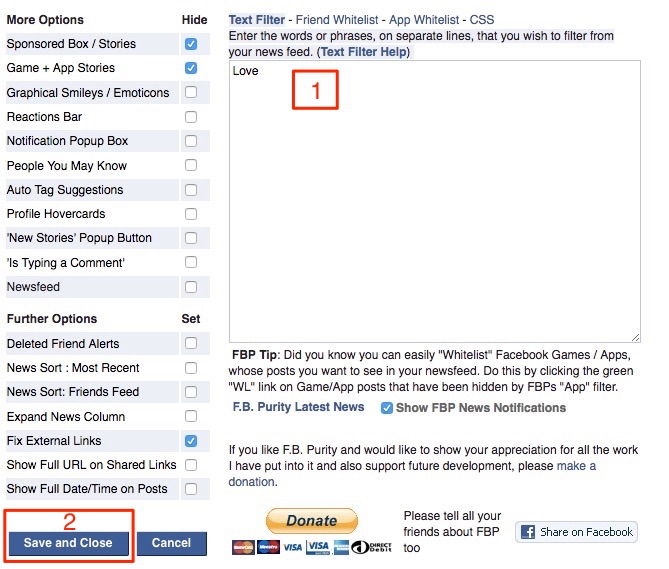
How do you maintain your sanity while being constantly bombarded with political posts all over your News Feed? Enter FB Purity's Text Filter,  wherein you can hide posts which contain a specific word.

How to Customize Facebook News Feed to See Relevant Posts | Viva Tricks

It also supports regular expressions, so you can blend and match words to your creativity. Site support has a nice little to create custom text filters guide. You chose to liquidate all posts that contain the word "love."

How to Customize Facebook News Feed to See Relevant Posts | Viva Tricks

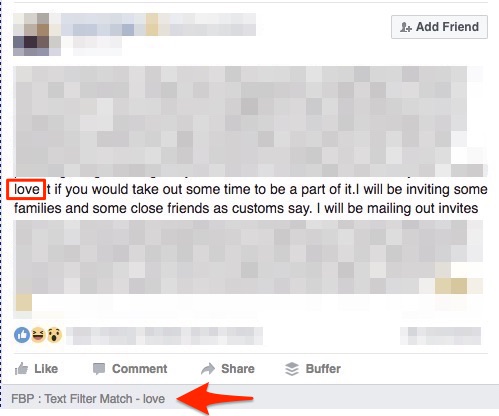
Notice how else to hide from my regular news feed, accompanied by the reason was hidden, which in this case is the "candidate of the text of the match - love" .Again, if you are wondering how to access filtered images, click on the "show" to an additional aspect of the the top of the latest news for you.

Hide Other Specific Types of Posts


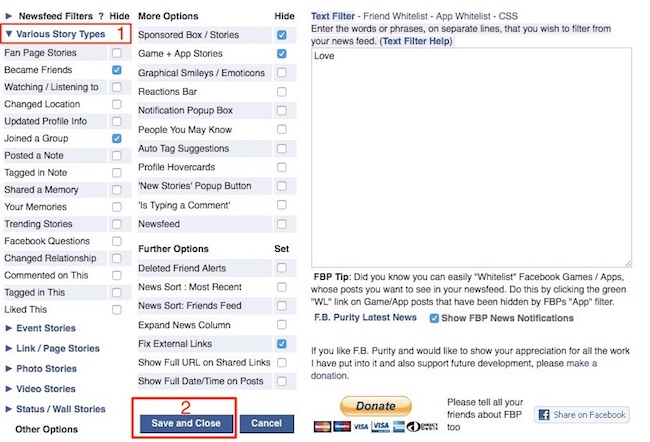
These days all kinds of jobs or stories appear in the News Feed - pictures, videos, check-life events and memories shared and so much more. FB Purity allows you to filter any kind of story from the latest news to you. I'm not a fan of seeing the check-ins from people when they are in flight? You can hide it completely. FBP open and click on "Various story types." Literally every type of story mentioned that Facebook currently has. Just put the check on the story you want to hide the type and click "Save and Close."

How to Customize Facebook News Feed to See Relevant Posts | Viva Tricks

The important thing to remember is that FB Purity scope and limited to the browser that is being installed. Since the extension does not work on mobile browsers, it means that you can not customize the news feed using FB Purity If access Facebook in the first place through a mobile application or mobile browser. While accessing Facebook from a mobile application or mobile browser, your best bet is to personalize your character News Feed using the built-in options that Facebook provides.

Take Control of YourFacebook News Feed Using These Tips


Using these default options and third-party browser extensions, you can take your Facebook experience to a whole new level by decluttering the latest news for you. If you have some other tips on how to personalize the Facebook news feed to show only relevant jobs, do not share with our fellow readers in the comments section below.

How to Customize Facebook News Feed to See Relevant Posts

How to Send Voice Messages on Facebook like Whatsapp?

Facebook is a social networking and online service launched in February 2004. It is owned by Facebook, Inc. As of September 2012, Facebook has more than one billion active users. Users can make a profile, add other users as friends, and send messages. Facebook users must be registered before using the site. Users can join the user groups. These groups have a place of work, school or college, or other interest. The service name comes from the name of a particular book to students at the beginning of the academic year by some universities in the United States. These books help students get to know each other better. Facebook allows any users who say they are at least 13 years old to become users of the site.

One can send instant audio clip to another person in the WhatsApp. We know all about it, but still did not reach this feature on Facebook. If you want to send any audio file on Facebook and in the beginning you need to open a chat and then a full conversation and then, attach an audio file to be sent. This is not very difficult but not very easy. If we can voice messages instantly like Watts in August? Well, I'm here to provide a tutorial that How to Send Voice Messages on Facebook, such as Whatsapp?. let's start:

How to Send Voice Messages on Facebook like Whatsapp?


#1: Log in to your Facebook and Click below button

Click Here

#2: Add an Extension in your Google Chrome Browser by hitting above button

How to Send Voice Messages on Facebook like Whatsapp? | VivaTricks

#3: Two new Tab will be opened.

#4: In first tab, Allow your Microphone for recording your Voice.

#5: In other tab, allow an app in your Facebook account. (Log in if required)

How to Send Voice Messages on Facebook like Whatsapp? | VivaTricks

How to Send Voice Messages on Facebook like Whatsapp? | VivaTricks

#6: Now, open any Chat or Message.

#07: There must be  a Mic Icon.

How to Send Voice Messages on Facebook like Whatsapp? | VivaTricks


#8: Click on it and Speak whatever you want to send in Audio Message.

#9: Click on Stop and wait while Audio is uploading

How to Send Voice Messages on Facebook like Whatsapp? | VivaTricks

#10: A link will be appeared after upload done.

How to Send Voice Messages on Facebook like Whatsapp? | VivaTricks

#11: Send that link. Don't worry, it will change to Audio player.

How to Send Voice Messages on Facebook like Whatsapp? | VivaTricks

#12: Done.

How to Send Voice Messages on Facebook like Whatsapp?

How to Recover an Hacked Facebook Account

Facebook is an addiction for many but it is important for everyone, correct me if I'm wrong, but people were so much obsessed with the social network, that many users (I personally know) and started using Facebook at work, family gatherings, at the airport, where No? However, such an addiction can sometimes be harmful, not physically but mentally. It happens when it gets to penetrate the expense of someone addicted so much on Facebook.

My friend called me yesterday only. Her friend was hacked Facebook account. Changed man who changed the password for her e-mail ID as well. Therefore, a girl or anyone who do not have knowledge about all this, can recover the expense of her again?

Well, this is a good question. Here are some steps you mentioned. Follow then, but for the first time I read that how you can lose your account.

How you lose it?


For example could be: since these ordinary users who always like to log on to Facebook their own accounts to make sure their own updates from "every second without care if they are in some cafes, a place a friend or office etc. sometimes ends losing personal Facebook own them because of the fear of utter indifference. some people are sharing their passwords who closed them, and sometimes their family members, or some of their friends as well. it seems incredible but it's true. many design programs or applications also by hackers to steal passwords. so do not add applications unwanted. download applications from trusted sites and tested only.

How to recover my hacked account?


If you are one of those who have been addicted to penetrate because of the negligence of the above or any other error Facebook account, then you must follow these steps to recover it:

Step 1: Go to www.Facebook.com/hacked

Step 2: Click on My Account is Compromised


Step 3: Enter Email, Phone, Username or Your Fb Name.


Step 4: Enter your Old Password or Current Password.


Step 5: Maybe it will ask you to upload image of your Govt. approved ID Proof i.e. Passport, Adhaar Card, Driver License, Ration Card, etc. After uploading Proof it will reviewed by Facebook. If you upload correct proofs then sure it will send you a link in your Email. Click that link.

Step 6: Or, just click Continue on Secure Your Account.


Step 7: Set a new Password; Of course unique.


Step 8: Done.

Now successfully restore your Facebook account. But this time, do not share your password with anyone. 😄!! We hope this tutorial guides you. If you still have some problems and then leave a comment below.

How to Recover an Hacked Facebook Account

How to Report Suicidal Post to Facebook (2 ways)

Social media and suicide have an important relationship. In one case known widely, the death of Phoebe Prince, is generally believed that their actions were motivated by cyberbullying. In 2008, police in the United Kingdom expressed concern that the "online communities" and the desire to achieve status through online memorials may encourage suicide. Vincent Nichols, Archbishop of Westminster, and warned that the popularity of social networking sites lead young people to form "transient relationships" which put them at risk of suicide when they collapsed. One of the high research questions asked by psychologists is where kids get the idea of ​​suicidal tendencies.

One explanation, which rose is a relationship of cause and effect between the suicides and social media that have been announced and the younger generations vulnerability. One of the reasons behind the children vulnerable to suicidal tendencies over the Internet is a psychological explanation behind the "fifteen minutes of fame." The media tend to blow up the video and put Facebook "in order to inform the public of the problem of high. But the media has not taken into account wagon band appeal they bring to the young minds and immature teenagers. Learn to work like this can give a teen, "fifteen minutes of fame" other teenagers influences who may feel under estimated to do the same in order to gain the attention. there was a research study conducted by the school of public Health at the University of Sydney, Australia. this study was conducted with the aim to find whether there was a relationship between suicidal ideation and media exposure social stories of suicides among young people (14-24). the study concluded that one of the most important sources mentioned suicide stories were social sites. this in mind, there was also a rise reported in feelings of despair and suicidal tendencies among participants surveyed. (Dunlop, more than that, and Romer 2009) [Wikipedia ]

Facebook recently launched a tool to prevent suicide if the victim recorded any mode of suicide on Facebook. If you have a friend or a family member of any such thing like this then you can save his / her life by taking simple steps. Just Reports / put him on the Facebook team. You can also check this page on Facebook about suicide prevention. There are two ways Facebook to report on this issue. The first method is effective (according to me), and the recommendation is easy as well. But, I remind every two steps. Its up to you, which one you used (if in this case)

Method.1 Facebook's Suicidal Content Report Page

  • Click here
  • Fill the form correctly
  • Just click Send button
  • Done

Method.2 Report on Post directly


Step 1: Click on the Down Arrow of the Post

Step 2: Click choose a option I don't like this post.


Step 3: Then a popup will appear. Select a option I think it shouldn't be on Facebook

Step 4: Click Continue


Step 5: Now choose an option It's threatening, violent or suicidal then of course Continue


Step 6: At last, select Suicidal Content or you can choose Self-harm option too.

Step 7: Click on Continue button.

Step 8: After all this, Facebook will show you a different option any offer help or support, communicate with friends, asking us to look at this post, and chat with assistant coaches, contact lifeline, etc. It is based on the country and the region as your place where you live.

I hope this post will guide you well. Allah never made the situation like this but if you are in this situation, your stills can save someone's life.

How to Report Suicidal Post to Facebook (2 ways)

Who Unfriended you on Facebook? Find out now

Facebook is the largest social media network having over 100 million users all over the world. Facebook is the best way to stay in touch with our friends and family members, and for some "anonymous" as well. Limit Facebook to make friends is 5000. Facebook gives each filter current city friends, birthdays choice, Muscat and many others, but I lost friends. Friends who remove you from their friends list. So here's a way to find out.

#1: By Installing Extensions


  • Install the Extensions for your Browser. For Firefox & Chrome.
  • Done. Now it will notify you whenever someone remove you from his/her List.
  • You can also check this by go to you friend list then click on Lost Friends Option.
Who Unfriended you on Facebook? Find out now

#2: Online Method


Who Unfriended you on Facebook? Find out now

How to Disable Apps Platform on Facebook

How can your Facebook account is disabled for applications. With this method, you will not see any more application request in the media. This is a great trick for those who do not use any one application.

On the other hand, there are many disadvantages of this trick. If you are using Login via Facebook on sites like Spotify and others, you will no more use this feature. He is also a lot of users on Twitter and Instagram account on Facebook. These users also can not access their Twitter and Instagram through the medium Facebook because these applications to operate and run through / with Facebook applications and if you disable your Facebook applications, then the application is no more access to your account. These are useful for only a hoax. Those used Facebook to chat, and to that purpose only.

How to Disable Apps Platform on Facebook?


#1: Log in to Facebook

#2: Click on Settings

#3: Click on Apps Option from left side menu or click here

#4: Click on Edit button for Apps, Websites and Plugins.


#5: A popup will appeared. Then click on Blue Disable Platform Button.


#6: Done.

How to Disable Apps Platform on Facebook

How to Block Facebook App Requests? (3 Ways)

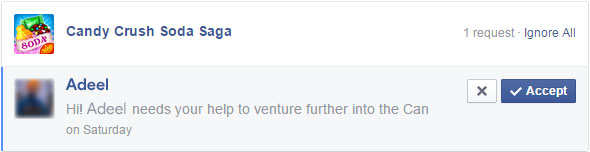
If you're on Facebook, chances are you have one friend at least that constantly sends calls you to play "Candy Crush Saga," smart puzzle game that has become the most popular game on the social networking site. The calls may come from-girlfriends former (or ex-boyfriends), and members of remote or childhood friends family have not spoken to in a decade - the attractiveness of addictive Candy crush and do not know crush bounds.Candy makes money for developers King.com, by force users to drive new levels, although users can get around this by inviting Facebook friends to the game. Because of the reward for calling transmissions, it is unlikely you'll ever get addicted Candy Crush in the social network to stop, but it turns out that there is a way to stop the Candy Crush announcements.It is difficult to avoid the masses of people playing candy Saga Crush, hit game addiction by King.com. But you can avoid annoying notifications that send you on Facebook.
Like Candy Crush Saga, there are many applications on Facebook those that do not want to play and make you angry calls. But not anymore. Here are some Simple Steps to Block Facebook App Requests. So lets try them.

Method 1 (Recommended and Easy)

#1: Log in to Facebook and pull down the notifications tab on the top right of your home screen.

#2: Hover over the X next to one of your App or Game notifications, which will prompt you to “Turn off”.


#3: Click the X, and it will give you the option to Turn Off or Keep On, Click Turn Off.


#4: Done. Its so Simple

Method 2

#1: Log in to Facebook. Go to Settings then Click Blocking Tab.

#2: On the Right Side. Scroll Down and look for Block apps.

#3: Type App Name. Select App.

#4: Done.

Method 3 (Not Recommended)

#1: Log in to Facebook. Go to App Center then Click Activity.

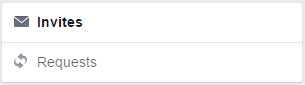
#2: On the Left Side, Click Invites.


#3: Click X from the left side for your App which irritates you.


#4: You can also Block the App from their too if you want.

#5: Done.

How to Block Facebook App Requests? (3 Ways)